
Rate My Face
Rate my face, honestly: one selfie gets a 1-10 score, a note on each feature, the one dragging you down and 3 things to change. Free, no sign-up.
- Free, no sign-up
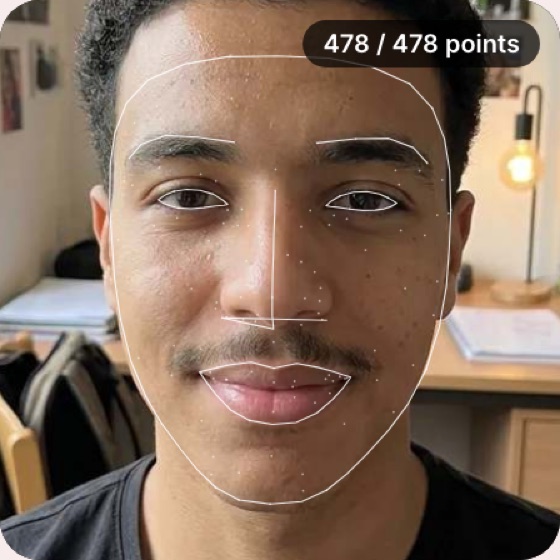
- 478 face landmarks measured
- Photo never stored
Upload your photo to get your report
Front-facing selfie, good lighting. JPG, PNG, WebP or HEIC. Drag & drop or paste (Ctrl+V).
Rate my faceMeasured on your device. The photo is sent once to the AI for the report; this site never saves it.
Good photo checklist
- Face the camera straight on, with the phone at eye level
- Even, soft light from the front; no strong shadows
- Neutral expression, hair off the face, no sunglasses or filters
- Hold the phone at arm's length or further: close-up selfies stretch the nose and shrink the jaw
How to get your face rated, step by step
Rate my face works in two passes: geometry on your own device, then an AI review of each feature.
- 1
Upload one selfie
JPG, PNG, WebP or HEIC. Your browser converts HEIC and shrinks the photo to at most 1024 px before anything else happens.
- 2
Your face is measured on your device
An open-source Google model maps 478 landmarks, and our code turns them into symmetry, golden ratio, facial thirds, face shape and eye tilt. Once the model has loaded, this takes about 3 seconds.
- 3
The AI writes your notes
The photo and those numbers go to the AI once. Back come a 1-10 rating, a potential score, a note on 8 features, your strengths and 3 tips.
What you get when you rate my face here
A number alone doesn't tell you what to change. This report is built around what to change first.
Your biggest drag, named
The feature the AI sees as holding your rating back sits next to your face mesh, with one concrete fix. If the AI names none, the lowest-scored feature takes its place. That's where effort pays off first, so you don't have to guess.
A potential score beside the rating
Potential is the AI's estimate of what the same face might score with better grooming, hair, skin care and a better photo. It's never below your rating. Read the gap as a hint, not a promise.
Measured and AI estimate, labelled
In the full breakdown, symmetry, golden ratio, thirds, face shape and canthal tilt sit in panels tagged Measured. The 8 feature scores and the tips sit in panels tagged AI estimate, and the 1-10 rating is an AI opinion too.
It tells you when the photo is the problem
A warning appears if your head is turned more than 12 degrees sideways or 15 up or down, or tilted over 10 degrees. It also flags a face that is small in the frame or shares the shot with another one.
Blunt, never cruel
The AI is told to be honest and kind, to place most faces between 5.0 and 7.5, and to say nothing about race, ethnicity, religion, health or weight.
Rate me: AI report vs a forum vs a score-only app
Three common ways to get rated, side by side. Apps are grouped by type, not named.
| This report | Rate-me forum | Score-only app | |
|---|---|---|---|
| Who rates you | An AI, working from your measurements | Whoever happens to reply | The app's own model |
| Your photo | Not saved by this site | Posted publicly | Depends on the app's policy |
| Reasons given | A note on each of 8 features | Depends on who replies | Varies by app |
| What to fix first | Biggest drag plus 3 tips | Whatever commenters notice | Varies by app |
| Same standard each time | Same instructions for every face | No, it depends on the crowd | Varies by app |
| Cost | five free reports a day, no sign-up | Free, needs an account | Varies by app |
When to rate my attractiveness with AI
The report is most useful when you compare photos you took under the same conditions.
Choosing a dating app photo
Rate my face on your three best shots and keep the one with no photo warning and the best notes. The tips point out when light or angle holds a shot back.
Before and after a haircut or beard
Rate my face before the change and again after, with the same light, distance and expression. Read the hair and jawline notes, and don't make much of a rating that moves a few tenths: that can be AI variation alone.
A looksmaxxing baseline
Start a glow-up with a written record: rating, potential, canthal tilt in degrees and your thirds. Retest after a few weeks of skin care or grooming.
Testing glasses and brows
Tips can cover brow shape and glasses frames. Try one photo with your frames and one without, and see whether the eyes note changes.
A work profile photo
A LinkedIn or team-page photo should read open and rested. The warnings catch tilted, too-small and group shots before you post them.
Looksmaxxing terms, explained plainly
Canthal tilt is the angle of the line from the inner to the outer corner of each eye. The report gives it in degrees and calls it upturned, neutral or downturned. Forums praise a slight upward tilt, but plenty of striking faces have neutral eyes.
Facial thirds split the face into forehead, midface and lower face. The landmark mesh stops below the hairline, so we compare only the middle and lower thirds, where equal is the ideal. Any upper-third figure from a selfie rests on a guess at the hairline.
Jawline talk usually means width and angle. We measure jaw width as a share of cheekbone width, plus the chin angle; the jawline score is the AI's read.
Mistakes that skew a face rating
Six habits that change your number without changing your face. Check them before you press Rate my face.
Mistake: Holding the phone close to your face.
Do this instead: Hold it at arm's length or further. Close-up lenses stretch the nose and shrink the jaw, and the AI sees that too.
Mistake: Smiling in one photo and not the next.
Do this instead: Keep one expression across every photo you compare. A relaxed, neutral face measures most consistently.
Mistake: Shooting under a ceiling light or beside a lamp.
Do this instead: Face a window. Even light from the front stops shadows from reading as uneven features.
Mistake: Ignoring a head-turn or tilt warning.
Do this instead: Retake the photo. Symmetry and proportions from a turned head are less reliable, even after correction.
Mistake: Comparing your score with another app's.
Do this instead: Every tool uses its own scale. Compare your own photos inside one tool, under the same conditions.
Mistake: Chasing a 10.
Do this instead: Look at the gap between your rating and your potential instead. It is the AI's estimate of what grooming, hair and a better photo might add; bone structure won't move.
What's free, what's stored and what it can't tell you
Your photo
This site does not save your photo: it is sent once to the AI for your report and then discarded, and we never use it to train models. It's measured in your browser, then sent once to the AI provider together with the measurements, in a single request. The site keeps no history of your reports.
Free, with a fair-use cap
Each press of Rate my face uses one of five free reports a day, with no account and no card. A report that breaks on our side doesn't count, but a photo the AI rejects as unusable does. Reports need a 5-second gap. Past that, leaving an email gets you 20 more that day.
What it can't do
The rating is one AI's opinion, not a clinical or scientific measure, and beauty standards vary by culture. We show no percentiles because we have no population data. Adults 18 and over only.